
Building a gaming PC can be one of the most rewarding experiences for gamers and tech enthusiasts alike. It offers not only the satisfaction of creating a customized machine tailored to your gaming needs but also the chance to learn about the components that make up a computer. Whether you’re a seasoned builder or a newcomer to the world of PC gaming, this guide will help you navigate the often complex landscape of components, performance, and budget considerations.
Understanding the Basics of PC Building
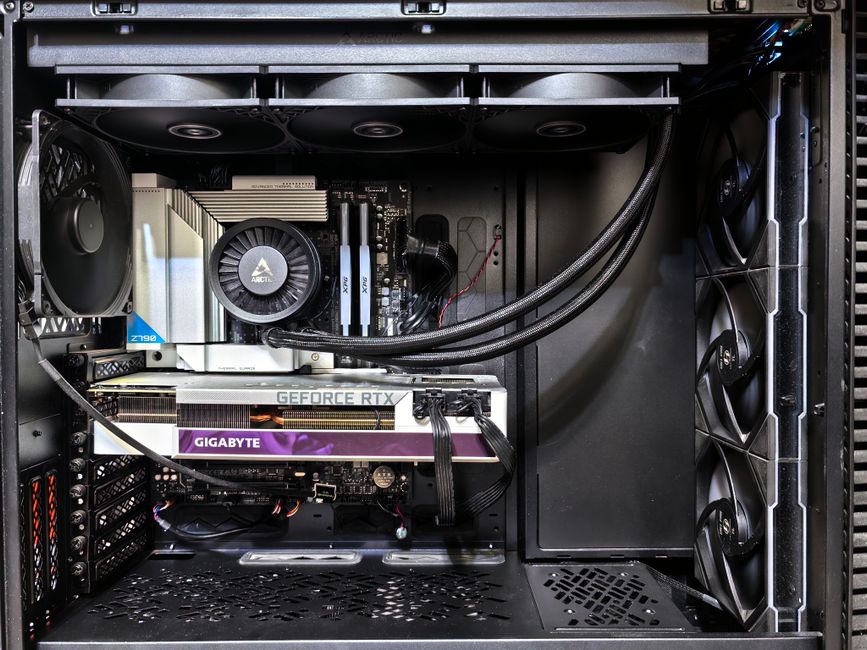
Before diving into the specifics of each component, it’s essential to understand the basic structure of a gaming PC. At its core, a gaming PC consists of several key components: the CPU, GPU, motherboard, RAM, storage, power supply, and case. Each of these parts plays a crucial role in the overall performance and capabilities of your gaming system.
The CPU, or Central Processing Unit, is often referred to as the brain of the computer. It handles most of the processing tasks and impacts how well your games run. The GPU, or Graphics Processing Unit, is vital for rendering graphics and delivering a smooth gaming experience. Choosing the right combination of these two components is crucial for achieving optimal performance.
When selecting parts, consider compatibility. Not all components work seamlessly together; for instance, the motherboard must support the chosen CPU and RAM. Tools like a gaming PC builder can help you ensure that all your selected parts will work together without any issues.
Choosing the Right Components
Now that you understand the essentials, it’s time to choose the right components for your build. Start with the CPU and GPU, as these will significantly impact your gaming performance. Popular choices include AMD Ryzen and Intel Core for CPUs, while NVIDIA GeForce and AMD Radeon are top contenders for GPUs.
Next, consider your RAM. A minimum of 16GB is recommended for gaming, but 32GB is becoming increasingly popular among gamers who multitask or use resource-intensive applications. Additionally, the speed of your RAM can affect system performance, so look for options that fit your motherboard’s specifications.
Storage is another critical factor. Solid State Drives (SSDs) are preferred for gaming due to their speed, but they can be expensive. A combination of an SSD for your operating system and frequently played games, along with a larger Hard Disk Drive (HDD) for storage of less frequently accessed data, can be a cost-effective solution.
Power Supply and Cooling Solutions
A reliable power supply unit (PSU) is essential for any gaming PC. It not only powers your components but also affects system stability and longevity. Look for a PSU with a good efficiency rating (80 Plus Bronze or better) and enough wattage to support your components, especially if you plan to overclock your CPU or GPU.
Cooling solutions are also crucial, as gaming PCs can generate a lot of heat. There are two primary types of cooling: air and liquid. Air cooling is generally easier to install and maintain, while liquid cooling can offer superior performance and aesthetics. Depending on your case and your personal preferences, choose a cooling system that keeps your components operating at optimal temperatures.
Don’t forget about the case itself. It should have sufficient space for your components and good airflow to keep everything cool. Additionally, consider aesthetics if you want your build to look as good as it performs.
Assembling Your Gaming PC
Once you have all your components, it’s time to assemble your gaming PC. Begin by preparing your workspace and ensuring that you have the necessary tools, typically just a screwdriver. Start by installing the CPU onto the motherboard, followed by the RAM and any storage devices.
Next, place the motherboard into the case and secure it with screws. After that, install the power supply and connect the necessary cables to the motherboard and components. Finally, install the GPU and ensure all components are properly connected.
After assembly, it’s crucial to test your system before installing the operating system. Check that all fans are spinning, and the system powers on correctly. If everything looks good, proceed to install your OS and drivers.
Maintaining Your Gaming PC
Once your gaming PC is up and running, maintenance is key to ensuring its longevity and performance. Regularly clean your system to prevent dust buildup, which can hinder airflow and cooling. Use compressed air to blow out dust from fans and components.
Keep an eye on system temperatures using monitoring software, especially during intense gaming sessions. If you notice high temperatures, consider improving your cooling system or reapplying thermal paste on your CPU.
Finally, stay updated with the latest software and drivers to ensure optimal performance and security. Regular updates can fix bugs and improve compatibility with new games.
Conclusion
Building a gaming PC is an exciting venture that allows you to customize your experience to fit your gaming style. By understanding the components, making informed choices, and maintaining your system, you can create a powerful machine that delivers exceptional performance. Whether you’re playing the latest AAA titles or engaging in competitive gaming, your custom-built gaming PC will be a source of pride and enjoyment for years to come.